By the Abstract team
The order is in the system. So is the inventory. But to find out whether it can ship, someone has to open a spreadsheet, confirm a detail on WhatsApp, and call the person who knows about the latest change.
Your company has software. Even so, a significant part of its coordination happens outside that software.
This deserves attention when systems do their individual jobs, but people must manually connect work across teams, confirm availability, handle exceptions, update statuses, or piece together what happened.
At Abstract, we start with the path the operation follows. Understanding the work left between tools lets us evaluate a solution that fits the problem. Adjusting a process or configuring an existing feature may be enough. In other cases, integrating systems or building a specific capability makes more sense.
Where the work no system shows is hiding
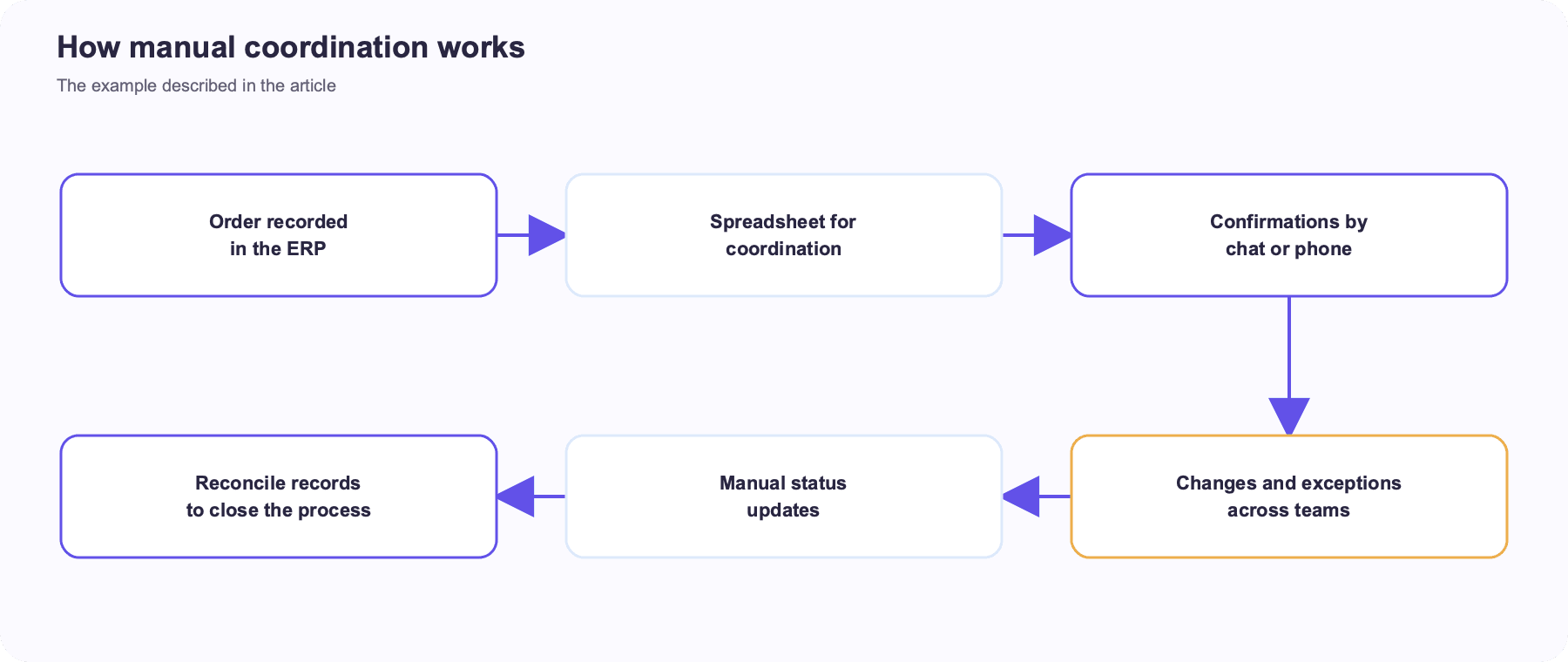
Imagine a distributor that receives orders in its ERP. The warehouse picks the products, transport arranges vehicles, and the administrative team needs delivery confirmation to continue its work.
Each team uses tools that serve its purpose. The problem appears at the handoffs. A date change is shared in a chat, the new priority lands in a spreadsheet, and proof of delivery arrives through another channel. Someone has to assemble those pieces to get an up-to-date view.
This example shows the difference between recording a transaction and coordinating the whole process around it. They are different capabilities.
The extra work may be spread across several people. Each person handles their part and the process moves forward, but it is hard to see how many interventions completion required.
That is a good place to start investigating. What information do teams have to chase? Which data do they enter again? Which decisions wait for confirmation that already exists in another tool?
Five signs your operational coordination needs a closer look
1. The same information is entered more than once
A data point leaves the ERP and is entered again in a spreadsheet, portal, or another team's tool. Ask what value the second entry adds. It may serve a genuine need for context or format, or it may exist because the tools do not exchange information.
Understanding the reason helps you assess integration, a process change, or an improvement to the current tool.
2. Finding the status means asking someone
“Has it left yet?”, “Is it approved?”, and “What is still missing?” are useful questions for identifying the visibility people need. If every answer requires a phone call, part of the operational status is scattered.
The goal is to define what information should be available, to whom, and when, while recognizing that each role has different responsibilities.
3. An exception pushes the work outside the usual flow
A delivery changes, information is incomplete, or a condition prevents the next step. The case moves to email or chat, and someone later has to record what was agreed in the system.
Exceptions reveal how the business really works. Some need human judgment; others follow known rules. Telling them apart helps design a process that recognizes each case and keeps its context.
4. Closing the process means reconciling different versions
At the end of a shift or month, teams report different figures. Before anything can be reported, they have to find which record is current, which movement is missing, and which change never made it into the system.
The investigation should follow those differences back to their source. A dashboard can display information, but consistency begins with how data is created and updated during the process.
5. The process relies too heavily on one person
Someone knows which spreadsheet is right, whom to call, and what to do when a special case appears. Their knowledge keeps the operation running, but it is hard to share while it remains unwritten.
Documenting rules, responsibilities, and statuses lets that knowledge shape both the work and the tools supporting it.
Measure the effort before investing
To understand the problem, watch the effort required to complete one operation. Record time spent searching, entering data twice, clarifying details, making corrections, and waiting between tasks.
The effect of a delay matters too. A pending confirmation may hold up several later activities. An inventory discrepancy may require coordination between the warehouse, sales, and administration.
The size of the problem comes from your own process data. To start, follow a few recent operations and record the following.
- Which people and systems took part.
- What information was entered or checked more than once.
- Where work stopped and why.
- Which exceptions required extra coordination.
- What happened to time, errors, and the final outcome.
This baseline helps you prioritize. It lets you compare the effort of fixing a problem with its effect on the organization, then measure what changed afterward.
Start by following one operation from beginning to end
A useful diagnosis can begin with a recent order, trip, receipt, or delivery. Choose one that required several teams and reconstruct the path it took.
Ask what happened from the first step to the last. Find the records, changes, and decisions. Listen to the people who did the work and those who received the information later.
The illustration represents the manual coordination in the opening example.
The review should identify what each step contributes. Some interventions are necessary work; others compensate for missing information or disconnected tools.
That distinction shapes the scope. Automating a poorly understood task can move the confusion into a new platform. Understanding the task lets you decide whether to keep it, simplify it, or connect it differently.
Four ways to improve while keeping what already works
Clarify the process and its responsibilities
The current tools may work well once teams agree on shared statuses, owners, and criteria. Defining who updates a piece of information and who uses it can resolve some of the coordination problem.
You still need to check whether the team can sustain the new way of working and whether the systems provide the visibility it needs.
Configure an available capability
Before building anything, check what the software you already pay for can do. A module, setting, or underused workflow may cover the need.
Test it with real cases, including exceptions. That shows how much it covers and what adopting it would require.
Integrate the existing systems
When tools perform their own jobs well but information has to travel between them by hand, integration may be the right approach.
Agree which system holds the main record, how records relate, and what happens if an update fails. Access, technical options, and each vendor's responsibilities also need review.
Build a capability of your own
If an important part of the process has rules and needs that available products cannot cover well, a custom solution may be worth considering.
It can focus on the missing coordination and connect to the ERP or other platforms. The scope depends on the problem. A portal, a field application, and an operations module serve different purposes.
These approaches can be combined. A sound decision keeps the existing capabilities that add value and defines precisely what needs to change.
What coordination built around the process could look like
One option is to keep records in their respective systems and connect the coordination, statuses, and exceptions where the process needs them.
- ERP and business records ↔ Process coordination
- Process coordination ↔ Warehouse, transport, and other teams
- Process coordination → Rules and exception handling
- Rules and exception handling → Available statuses and traceability
- Available statuses and traceability → Monitoring and management
This outline is illustrative. Architecture and scope should come from each company's diagnosis. Sometimes one integration is enough; other cases call for a new capability or a change in responsibilities.
What our experience brings to that assessment
At Cementos Bío Bío, Abstract connected trip scheduling, participants, access rules, and system integrations. At Red de Alimentos, we addressed inventory, orders, allocation, and distribution with a custom WMS and shared master data.
These are different projects, but both required us to understand the relationship between people's work and the systems supporting it. That experience helps us ask specific questions about coordination, traceability, and exceptions.
When we assess a new need, we look for the priority process, the available options, and the conditions for implementing them. That foundation makes it possible to define a first solution and how to check whether it works.
What to bring to a first conversation
Bring a recent example in which your team had to chase information or coordinate an exception. A related spreadsheet, workflow, or screen is useful too.
We can start with one question. What does a person have to do today to finish the work your systems leave undone?
At Abstract, we help you understand that work, evaluate the options, and decide what to integrate, adjust, or build. The solution is shaped around the operation you need to sustain.
Let's talk about the process that still depends on spreadsheets, messages, and confirmations.