By the Abstract team
Your company needs to solve a problem. It may be coordinating deliveries, seeing what stock is available, connecting teams, or giving customers an easier way to work with you.
Three options usually come up. You can buy a tool, connect the ones you already use, or build a solution of your own. Any of them may be right. The choice depends on what needs to change and the conditions the solution will face.
At Abstract, we work through that assessment with the client. We understand the process, review the tools, and define which approach can address the need with a scope that can actually be delivered. The recommendation may combine configuration, integration, and development.
This guide brings together the questions worth answering before committing to implementation.
Start by describing the business problem
“We need an app” suggests a solution. To compare options, you first need to understand what work that app should enable and why your current tools cannot handle it.
A more useful description might be “Our field team needs to record an inspection without a connection and sync it later.” That gives you a basis for investigating users, devices, data, connectivity, and the systems involved.
The same applies to “we need a dashboard.” Perhaps the difficulty is finding information; perhaps teams record the same event in incompatible ways. These problems are related, but they call for different responses.
Start with a recent example. Establish what happened, who was involved, which tools they used, and what the difficulty cost. Then define what would need to happen for you to consider the problem solved.
A technology decision improves when you have a concrete outcome against which to compare the options.
When buying or configuring existing software makes sense
An available product may be a good choice when it covers the process you need and supports a way of working your organization can accept.
Look beyond the sales demo. Ask to walk through a real case with the people who will use the system. See how data is recorded, responsibilities assigned, and the exceptions that matter to your operation handled.
Check how it works with systems you already have. A tool may be strong on its own yet require additional work to share information with the rest of the business.
Before choosing, answer a few questions.
- Which parts of the process does it cover, and which tasks remain outside it?
- What configuration does it need, and who can do that work?
- How are data imported, accessed, and exported?
- Which integrations are available, and on what terms?
- How are users, support, and changes managed?
Buying can let you use an existing capability and focus effort on configuration, migration, and adoption. Those stages are part of implementation and belong in the assessment.
When integrating your existing systems makes sense
Integration deserves attention when your tools perform their individual jobs well, but the process needs them to exchange information.
For example, an ERP may record an order while another platform coordinates its delivery. If the team re-enters data to keep them aligned, that connection is worth examining.
The work begins with agreeing what should move between systems and what it means. A customer may have different identifiers in each tool; an order may change status under different conditions. Those references have to be reconciled before the information is useful.
You also need to define what happens when an exchange fails. Who notices? Which part of the process can continue? How is the information recovered? These questions affect both daily operations and the scope of the integration.
Feasibility depends on access, available interfaces, permissions, and cooperation from vendors. Review those factors early, before treating a technical dependency as solved.
In our CBB project, integration served a specific operational need: coordinating trips, rules, and statuses across systems. The case shows why process design and data exchange must be worked through together.
When building your own solution makes sense
Custom development is an option when the capabilities you need do not fit the products you have evaluated, or adapting those products would call for a solution of its own.
This may involve distinctive rules, several types of users, a process connecting different teams, or field conditions that shape how people use the product.
To evaluate it, describe those needs precisely. Which rules are essential? Which can be simplified? What must work in the first release? Which systems must stay in place, and how will they connect?
Our work with Red de Alimentos is one example. It included a WMS tailored to its network, covering receiving, inventory, orders, picking, dispatch, and allocation based on availability, needs, and restrictions. The product decision had to account for that operating model and its data.
A custom solution also calls for a plan beyond launch: support, changes, documentation, access, and infrastructure. Defining those responsibilities from the outset lets you assess the full operating commitment.
Combining approaches may be the best answer
A company can keep its ERP, buy a tool for a standard process, and build a module for a specific need. Integration connects the pieces so work can move between them.
This broadens the assessment. It helps separate what already works, what can be configured, and where development is genuinely needed.
Each component should have a clear job. Agree where the main record lives, which rules each system applies, and how an exception crossing several tools will be handled.
The following matrix can help structure an initial conversation.
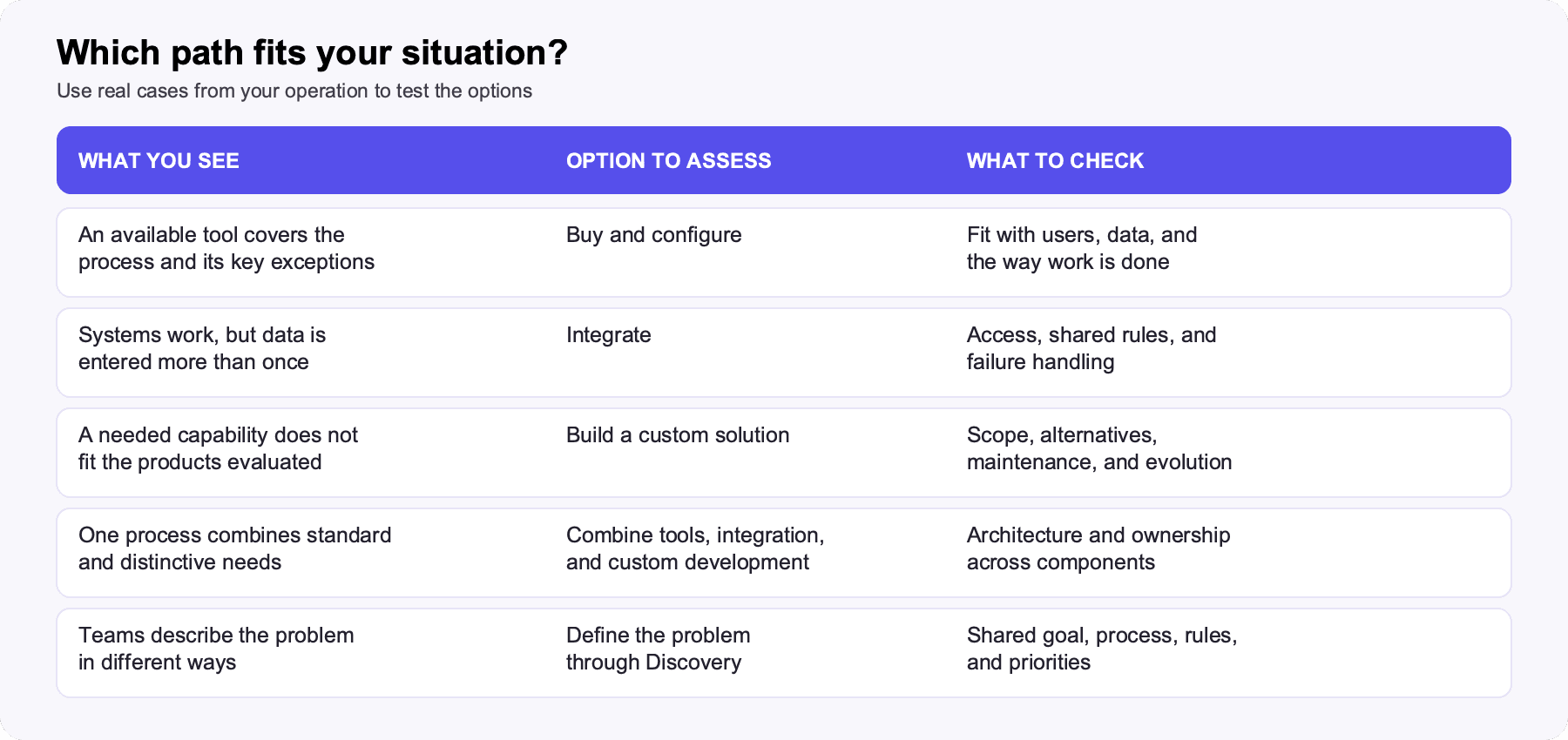
The matrix guides the assessment. The final decision needs evidence from your own company.
A practical path to a sound decision
The process can begin like this.
- Define the problem and desired outcome → Review the current process and tools
- Review the current process and tools → Can an existing capability cover the need?
- Can an existing capability cover the need? → Assess configuration, purchase, and adoption (yes)
- Can an existing capability cover the need? → Assess integration and shared rules (gap between systems)
- Can an existing capability cover the need? → Assess custom development (missing specific capability)
- Assess configuration, purchase, and adoption → Compare scope, costs, dependencies, and risks
- Assess integration and shared rules → Compare scope, costs, dependencies, and risks
- Assess custom development → Compare scope, costs, dependencies, and risks
- Compare scope, costs, dependencies, and risks → Test the option with real cases
- Test the option with real cases → Define a first implementation and how to measure it
The review may reveal combinations. A product covering most of the need may still require integration; a custom module may rely on available services. The path should let you compare these choices.
Compare the full effort of each approach
The headline price is only part of the assessment. To compare options, establish what each includes and what work will still fall to your team.
For a purchased tool, review configuration, licenses, migration, training, support, and integrations. For custom development, include definition, design, build, testing, deployment, and maintenance. In both cases, consider dependencies and what it would take to change direction later.
Adoption matters too. A solution that fits on paper may require people to change responsibilities or how they record information. Involve those who run the process to confirm the proposed way of working is usable.
Compare over the same period and on terms relevant to your company. That makes it possible to discuss total cost and capabilities using explicit assumptions, instead of comparing quotes for different scopes.
Test the fit before expanding the investment
Choose an important path through the process and a common exception. Ask each option to show how it would handle both, with the right users and data.
For a distribution operation, you might follow an order from entry through confirmed delivery. Then introduce a change, such as lower stock or a condition that blocks progress. See what information remains visible and what each person has to do.
This is only an example. The right cases come from your operation and its priorities. The goal is to expose differences that a feature checklist can miss.
From that evidence, you can define a first implementation, acceptance criteria, and how to measure the result. Measures might include cycle time, errors, manual interventions, or traceability.
When Discovery helps
Discovery is a definition phase that reduces uncertainty about the problem, users, rules, and possible solutions. Depending on the project, it may include interviews, document and system reviews, or observation on site.
It is worth considering when uncertainty prevents you from comparing options or setting a responsible scope. The output should help you decide what to do, where to begin, and which conditions matter.
If the problem, scope, and criteria are already clear enough, we can move to an implementation proposal. The depth of definition should match the questions still open in each case.
How Abstract can help
Our experience combines understanding operations, product design, development, and system integration with support and platform evolution.
We work with you to connect those capabilities to a concrete need. We can review what you have, compare the options, and define a first scope that makes sense for your business.
The first conversation can begin with the process you want to improve, the tools you use, and an example of what is difficult today. From there, we can establish what we need to understand and which options are worth evaluating.
Let's talk about what your company should buy, integrate, or build.